Troubleshooting Roles
Missing role item for a system
When attempting to add a role item to a role, you may be presented with the following error:
A role item already exists for each possible role membership relation.
If the system you want to add is not already present in the list, then one of the following cases is the likely culprit:
The selected filter does not return the system's unique user identifier (e.g.,
Users.objectGUIDfor Active Directory orUsers.IDfor Google Workspace). Modify the filter to ensure those columns are selected under the Column Selection tab.The user objects of the system do not have an n-n relationship with that system's groups or assignable role items.
Missing member ID in the Membership Report
If the Member ID column of the Members report is empty, as shown below, it is likely that the unique identifier for the user objects in the selected filter is either no longer being returned by the filter, or it has been renamed.
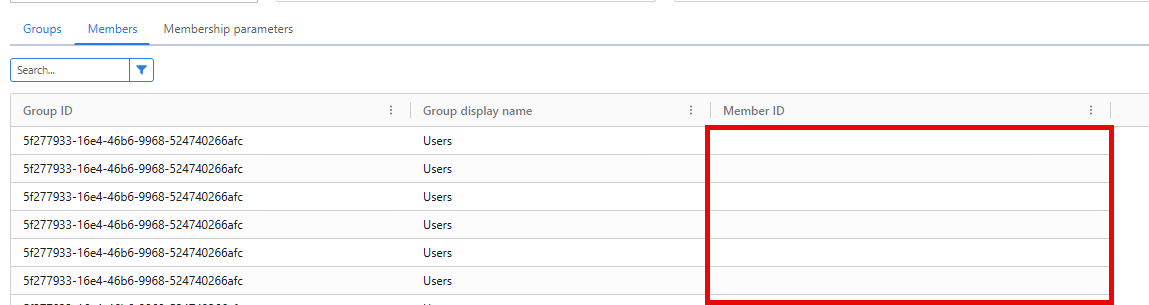
Check the filter and ensure that the unique identifier for users is being returned (e.g., Users.objectGUID for Active Directory or Users.ID for Google Workspace).
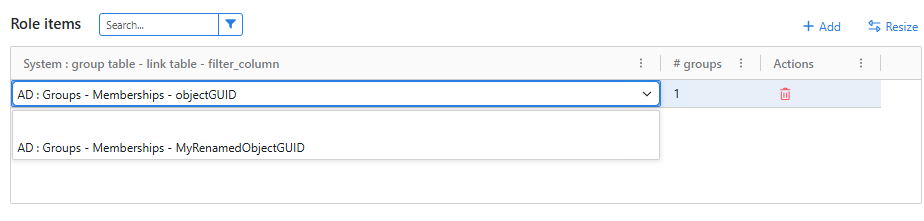
If the unique identifier is being returned by the filter, the column may have been renamed. Double click on the role item to show its binding options. In the screenshot below, we can see that objectGUID has been renamed to MyRenamedObjectGUID. In this case, selecting the renamed binding fixes the membership list of the role.
Missing systems in role scopes
There are generally two causes of systems missing from the role scopes screen.
There are no roles defined that have the system added as a role item. You will need to add a role item for a system before you can define a scope.
There are roles with the system added as a role item, but their filters are either missing or invalid. Check the validation report for errors.
Grayed-out role scopes
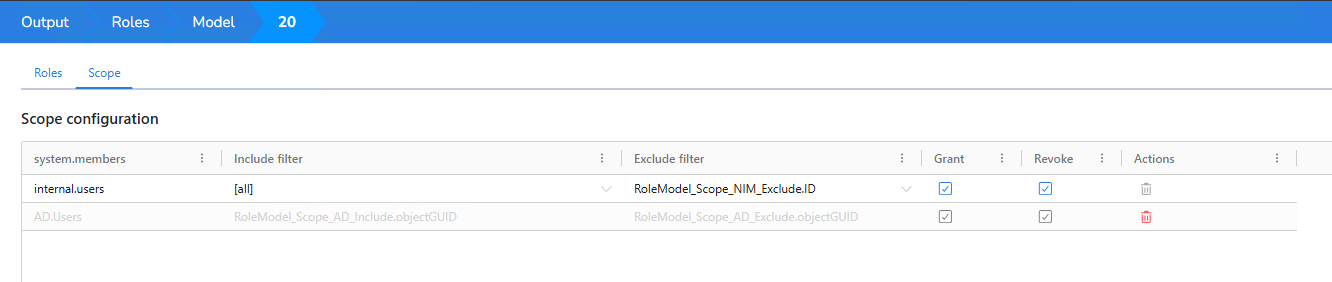
When role scopes are grayed out and unavailable for any change besides deletion, as shown below, it is an indication that the scope has been previously defined, but there are either no longer any role items for this system in the role model, or the filters associated with those roles are missing or invalid. Check the validation report for errors.